How to Improve SEO on Google: Fixes That Boost Visibility
Practical 90-day playbook to improve SEO on Google in 2026: technical fixes, on-page rewrites, and a 4-step CTR Recovery Loop with a falsifiable stop rule.
Most SEO advice says "improve your titles" and "speed up your site." That is not a fix. That is a feeling. Real fixes are specific, measurable, and reversible. This guide gives you a 90-day playbook to learn how to improve SEO on Google: a four-step CTR Recovery Loop, the technical checks that move rankings in 2026, and the tools that prove your fixes worked.
You run a site. You need it to bring in customers. You have an hour or two a week for SEO, not a full-time team. We focus on visibility (do you show up?) and clicks (do searchers actually click?). The piece you will not get elsewhere is the CTR Recovery Loop, a four-step workflow you run every two weeks against your own Search Console data. It turns "rewrite your titles" into a measurable habit with a stop rule.
How to improve SEO on Google: how Google evaluates pages
Google ranks pages on three things: relevance, quality, and accessibility. Relevance means your page answers the query. Quality means the answer is useful, accurate, and trustworthy. Accessibility means Google can crawl, render, and index the page without stumbling.
The official Google SEO Starter Guide lays this out in plain language. Read it once. Then come back here for the fixes.
Here is the thing most checklists miss: ranking and click-through rate are two different problems. You can rank #4 and still lose to a weaker site at #5 if their title is sharper. The fixes below tackle both, in order of impact. For a non-technical primer first, see our step-by-step SEO guide for non-technical creators.
On-page SEO: content, keywords, and HTML that improve visibility

On-page SEO is the work you do on the page itself. Three levers move the needle: keyword mapping, title and meta tags, and the headings that organize your content.
Keyword research and mapping
Open Search Console. Go to Performance, then Queries. Sort by impressions. The top 50 queries are the ones Google already thinks you are relevant for.
Group those queries by intent. "Best SEO tool 2026" wants a comparison. "How to fix INP" wants a tutorial. Each intent gets one page. Two pages targeting the same intent is keyword cannibalization: your own pages competing for the same customer. For a deeper read on intent classes, see our guide to keyword types and content mapping.
Action: open a spreadsheet. Column A query, Column B target URL, Column C intent type. If two queries with the same intent map to two different pages, pick one and 301-redirect the other.
Title tags, meta descriptions, headings, and rich snippets
Your title tag and meta description are the only pieces of your page most searchers ever read. Get them wrong, and the people Google sends to your search result keep scrolling.
Use the Title-Promise-Spec template: outcome + qualifier + specific. Outcome is what the reader gets. Qualifier is who it is for or what it costs. Specific is a number, year, or named comparison. Example: "Cut Cart Abandonment 30% (For Shopify Stores Under $1M Revenue)." That title sells the click without lying.
Meta descriptions follow the same rule. 150-160 characters. Lead with the outcome. Industry benchmarks from Advanced Web Ranking 2026 CTR study show position 1 captures roughly 39.8% of clicks; position 5 captures about 5.1%. The gap between a sharp title at #5 and a vague title at #5 is what you can move this quarter.
For richer search results, add structured data. Google's structured data documentation lists the supported types: FAQ, HowTo, Article, Product. Pick the one that matches your page and validate with the Rich Results Test.
Technical SEO fixes that unlock crawling, indexing, and speed

Technical SEO is plumbing. It rarely gets you new traffic on its own. It just stops you from leaking the traffic you already earned. Run these four checks in order. Each one fixes a different way Google can fail to rank a page that deserves to rank.
- Indexability. Open Search Console, click any URL, then "Test live URL." If the live test says "URL is not on Google" but the page works in your browser, you have a robots.txt block, a noindex tag, or a canonical pointing somewhere else. Fix the directive, then click Request Indexing.
- Canonical tags. Every page needs one canonical pointing at itself (or at the version you want indexed). Mismatched canonicals on paginated lists, parameter URLs, and duplicate sort orders are the quiet killer of e-commerce indexing.
- Mobile rendering. Use Search Console URL Inspection to view the rendered HTML Google sees on mobile. If your nav, content, or above-the-fold images are missing from that render, your JavaScript is hiding them from Google.
- Core Web Vitals (especially INP). Google replaced FID with INP in March 2024. INP measures how fast your page responds when a user taps or types. Per web.dev INP guidance, the threshold is 200ms or better. Fix slow JavaScript handlers before chasing LCP.
Content strategy and examples: pages that satisfy intent
Search intent is what someone actually wants when they type a query. Match it, and you rank. Miss it, and you do not, no matter how many keywords you stuff in. Two short before-and-after examples make this concrete.
Before: A SaaS company published "What Is Inventory Forecasting?" — a 600-word definition page. Google ranked it #18. The intent is comparison-shopping, not dictionary-lookup.
After: They rewrote it as "Inventory Forecasting: 4 Methods Compared (With Spreadsheet Templates)." Same URL. Added a comparison table, templates, and a 90-second walkthrough. Within 60 days the page moved to #6 and started converting. The fix was matching intent, not adding words.
Before: A local plumber's homepage title read "Smith Plumbing - Quality Service Since 1998." Generic. The page ranked #11 for "emergency plumber [city]."
After: New title: "Emergency Plumber in [City] - 24/7, Arrival Within 60 Min." Body added a same-day pricing table and three reviews. The page jumped to #3 within 30 days; CTR roughly doubled per Search Console. The title was now the offer.
Measure, monitor, and diagnose with Google tools

If you only have time for two free tools, use these: Search Console and PageSpeed Insights. Both are official Google tools. Both are free. Both tell you something nothing else does.
Search Console answers four questions: Is Google indexing my pages? Which queries do they rank for? What is my position? What is my CTR? PageSpeed Insights tells you whether your Core Web Vitals are passing on real-world traffic via the Chrome UX Report.
Diagnostic flow when traffic drops:
- Open Search Console > Performance. Compare last 28 days vs prior 28 days.
- Pick the page with the biggest drop. If position dropped, you have a ranking problem. If position is flat but CTR dropped, you have a presentation problem.
- Run URL Inspection. Confirm it is indexed and the rendered HTML matches.
- Run PageSpeed Insights. Check INP and LCP on mobile.
- Pick the single most likely cause. Fix it. Wait 14 days. Re-measure.
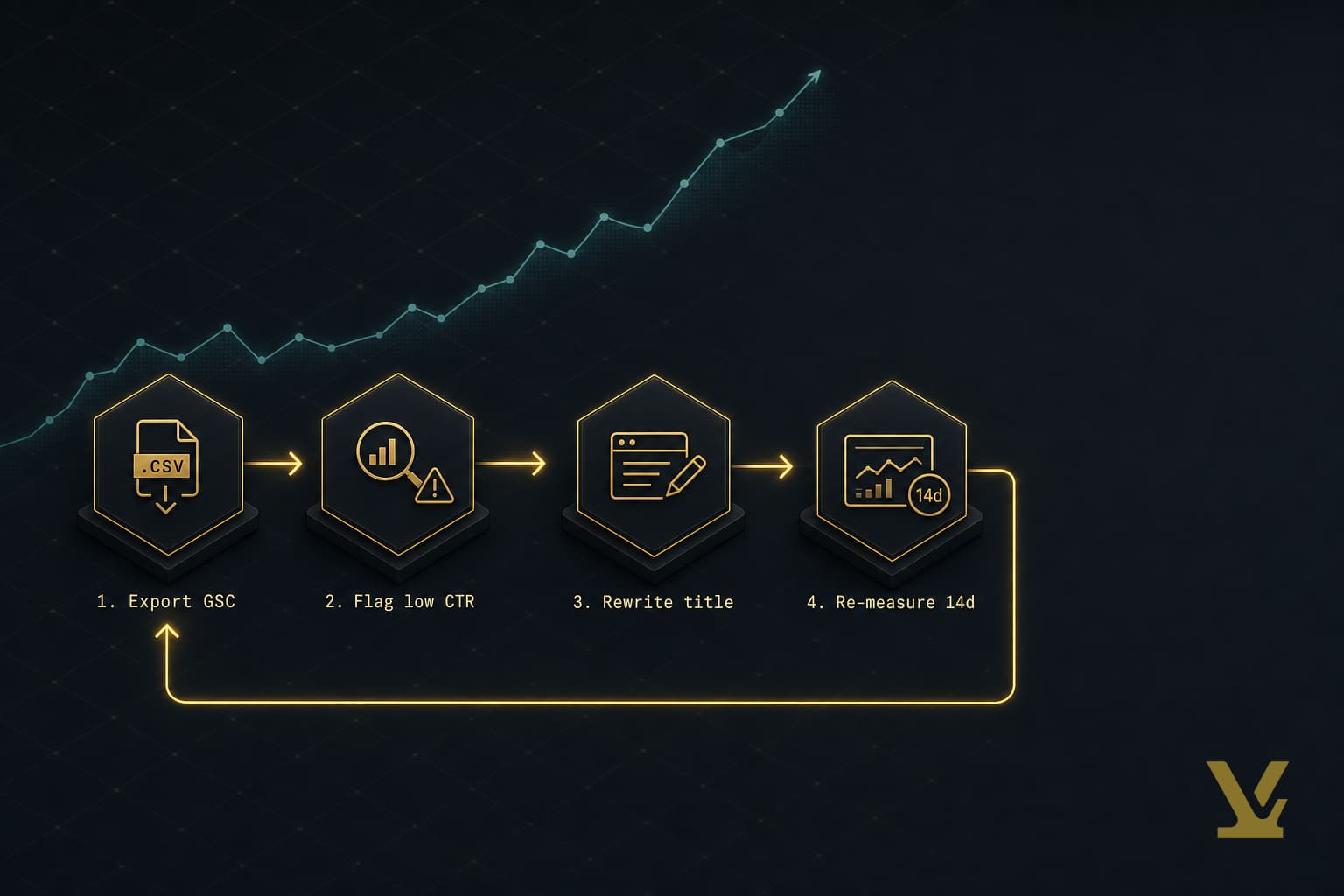
The CTR Recovery Loop: a 14-day cycle for measurable click gains
This is the workflow you cannot find in the top 10 results. It turns "improve your titles" into a process with a stop rule.
- Export. In Search Console > Performance, filter for pages at average position 5-20. Export queries and pages to CSV.
- Flag. Compare each page's CTR against the position-class median from the Advanced Web Ranking 2026 CTR study. Flag any page whose CTR is 40% or more below median for its position. Those are your rewrite candidates.
- Rewrite. Apply the Title-Promise-Spec template. Rewrite both the title tag and meta description. One page per cycle so you can attribute the change.
- Re-measure. Wait 14 days. Compare CTR over the new window vs the prior 14 days at the same average position. If CTR is up, keep it. If CTR dropped, revert. Move to the next flagged page.
The loop matters because it is falsifiable. You either move CTR or you do not, and you find out in two weeks. That beats arguing about title craft for six months.
DIY vs hiring help, and a 90-day prioritized checklist
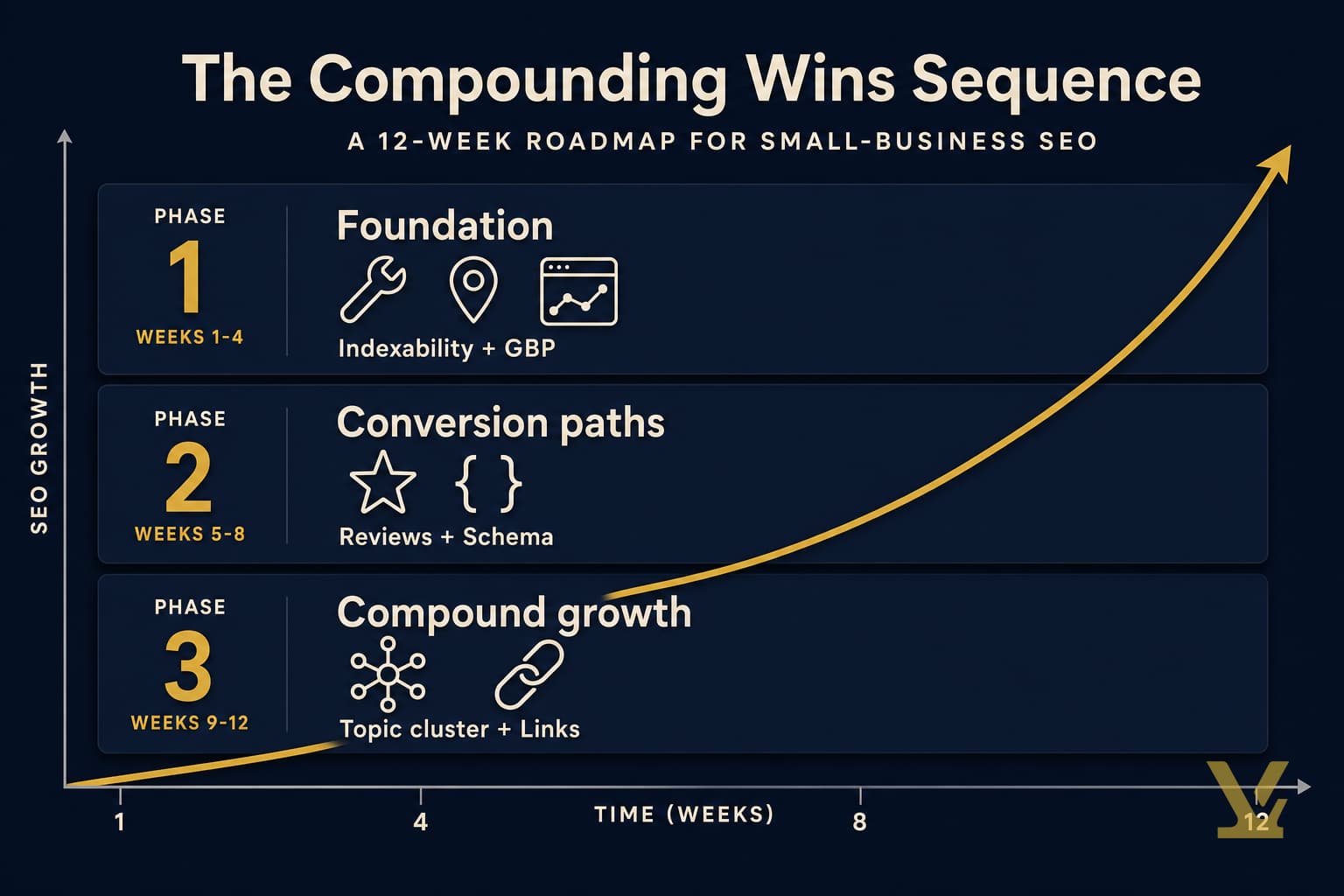
DIY if you have one site, fewer than 200 pages, and a few hours a week. Hire a freelancer for technical migrations. Hire an agency only when SEO is already a revenue channel. For realistic payoff windows, see how long SEO typically takes in 2026. Your 90-day checklist:
- Days 1-7: Verify Search Console and Bing Webmaster Tools. Submit your sitemap. Read your top 50 queries.
- Days 8-21: Run the indexability/canonical/mobile-render/INP audit on your top 20 pages. Fix every red flag.
- Days 22-45: Map every top-50 query to one canonical page. 301-redirect duplicates. Consolidate cannibalized pages.
- Days 46-75: Run the CTR Recovery Loop on three pages per cycle. Apply the Title-Promise-Spec template. Re-measure.
- Days 76-90: Add structured data (FAQ, HowTo, Article) to your top 10 pages. Validate with Rich Results Test. Re-check rankings monthly going forward.
How VarynForge fits in
The whole loop above runs on data you already have in Search Console. Where most operators get stuck is the planning step before the loop: which pages and queries to prioritize across a growing site. VarynForge is the tool we built for that gap. Drop in a domain or topic, and it returns a ranked content plan with intent labels, cluster groupings, and the search queries each page should target. Use it to seed your spreadsheet faster, then run the CTR Recovery Loop and 90-day checklist exactly as above. See the VarynForge homepage for a live example.
Frequently Asked Questions
What are the quickest fixes that increase visibility and clicks?
Fix titles and meta descriptions on pages ranking position 5-20. Those are pages Google already trusts; they need a sharper sales pitch on the SERP. Apply the Title-Promise-Spec template (outcome + qualifier + specific) and re-measure CTR after 14 days. Most sites have at least five pages where this alone moves clicks 20-40% within a month.
How do I check my SEO using Search Console and PageSpeed Insights?
Search Console answers four questions: indexing status, queries you rank for, position, and CTR. Open it weekly and compare 28-day windows. PageSpeed Insights tells you whether your Core Web Vitals (LCP, INP, CLS) are passing on real-world traffic. Run a page that dropped traffic through URL Inspection first, then through PageSpeed.
How should I map keywords to pages to avoid cannibalization?
Group queries by intent. Each intent gets one page. If two pages target the same intent, pick the better-performing URL and 301-redirect the other. Build a spreadsheet with query, target URL, and intent so the mapping stays visible as you publish more.
Which technical issues most often prevent Google from indexing?
Four show up most: unintended noindex or robots.txt blocks, mismatched canonicals on paginated and parameter URLs, JavaScript that hides content from the rendered HTML on mobile, and slow INP from heavy event handlers. Run all four checks via Search Console URL Inspection plus PageSpeed Insights. Fix the failing one first.
Can I do SEO myself, and what should I hire help for?
If your site is under 200 pages, you can run the entire 90-day checklist yourself. Hire a freelancer for one-off technical work where mistakes are expensive: CMS migrations, domain moves, hreflang rollouts. Hire an agency only when SEO is already a meaningful revenue channel that needs scale.
How long does it take to see improvements after fixes?
CTR fixes (titles, meta) show up in Search Console within 7-14 days. Technical fixes (indexability, canonicals) show up within one crawl cycle, usually 1-3 weeks. Ranking changes from content rewrites take 30-90 days. If you see no movement after 90 days, go back to the data and pick a different cause.
Further Reading
- Google: SEO Starter Guide
- Google Search Central Blog
- web.dev: Learn Core Web Vitals
- Advanced Web Ranking: Google Organic CTR Study
- Google Search Central
- What is SEO? A straightforward guide
- How to improve SEO for small businesses
Sources
- Google Search Central, SEO Starter Guide
- Advanced Web Ranking, Google Organic CTR Study (2026)
- web.dev, Interaction to Next Paint (INP)
- Google Search Central, Structured Data Documentation
- Google, About Search Console
- Google, Chrome UX Report (CrUX) Documentation
Key Takeaways
Improving SEO on Google is a sequence: get indexed, target the right intent, rewrite for clicks, then measure. The CTR Recovery Loop turns "rewrite your titles" into a 14-day cycle anchored to public CTR benchmarks. Run technical fixes first, then on-page rewrites, then structured data. Pick one page this week. Run URL Inspection, then PageSpeed Insights. Apply the Title-Promise-Spec template. Wait 14 days. Re-measure. That is how SEO compounds.
Frequently asked questions
What are the quickest fixes that increase visibility and clicks on Google?
Fix titles and meta descriptions on pages ranking position 5 to 20. Those are pages Google already trusts; they need a sharper sales pitch on the SERP. Apply the Title-Promise-Spec template (outcome plus qualifier plus specific) and re-measure CTR after 14 days. Most sites have at least five pages where this alone moves clicks 20 to 40 percent within a month. Industry benchmarks from the Advanced Web Ranking 2026 CTR study show position 1 captures roughly 39.8 percent of clicks while position 5 captures about 5.1 percent, so the gap between a sharp title at position 5 and a vague title at position 5 is what you can move this quarter.
How do I check my SEO using Search Console and PageSpeed Insights?
Search Console answers four questions: indexing status, queries you rank for, position, and CTR. Open it weekly and compare 28-day windows. PageSpeed Insights tells you whether your Core Web Vitals (LCP, INP, CLS) are passing on real-world traffic via the Chrome UX Report. Run a page that dropped traffic through URL Inspection first, then through PageSpeed. If the live test says URL is not on Google but the page works in your browser, you have a robots.txt block, a noindex tag, or a canonical pointing somewhere else. Fix the directive and request indexing.
What is the CTR Recovery Loop?
The CTR Recovery Loop is a four-step 14-day cycle that turns rewriting titles into a falsifiable process. Export queries and pages at average position 5 to 20 from Search Console. Flag any page whose CTR is 40 percent or more below the position-class median in the Advanced Web Ranking 2026 CTR study. Rewrite both title tag and meta description using the Title-Promise-Spec template, one page per cycle so you can attribute the change. Wait 14 days and re-measure CTR over the new window versus the prior 14 days at the same average position. If CTR is up, keep it; if it dropped, revert and move to the next flagged page.
How should I map keywords to pages to avoid cannibalization?
Group queries by intent. Each intent gets one page. If two pages target the same intent, pick the better-performing URL and 301-redirect the other. Build a spreadsheet with three columns: query, target URL, and intent type. The mapping has to stay visible as you publish more, otherwise you create the same competing-page problem you just fixed. Search Console Performance is the source of truth for which queries Google already associates with which page. Sort the top 50 queries by impressions, then group them: best SEO tool 2026 wants a comparison, how to fix INP wants a tutorial, and each intent gets its own page.
Which technical issues most often prevent Google from indexing?
Four show up most. Unintended noindex or robots.txt blocks. Mismatched canonicals on paginated and parameter URLs, the quiet killer of e-commerce indexing. JavaScript that hides content from the rendered HTML on mobile. Slow Interaction to Next Paint from heavy event handlers. Google replaced FID with INP in March 2024, with a threshold of 200 milliseconds or better per web.dev INP guidance. Run all four checks via Search Console URL Inspection plus PageSpeed Insights. Fix the failing one first, then move on. Each represents a different way Google can fail to rank a page that deserves to rank.
Can I do SEO myself, and what should I hire help for?
If your site is under 200 pages, you can run the entire 90-day checklist yourself. Hire a freelancer for one-off technical work where mistakes are expensive: CMS migrations, domain moves, hreflang rollouts. Hire an agency only when SEO is already a meaningful revenue channel that needs scale. The entire 90-day playbook (verify Search Console, audit indexability, map queries, run the CTR Recovery Loop, add structured data) runs on data you already have in Search Console. Most operators get stuck on planning before the loop, not on the loop itself.
How long does it take to see SEO improvements after fixes?
CTR fixes (titles, meta descriptions) show up in Search Console within 7 to 14 days. Technical fixes (indexability, canonicals) show up within one crawl cycle, usually 1 to 3 weeks. Ranking changes from content rewrites take 30 to 90 days. If you see no movement after 90 days, go back to the data and pick a different cause. The whole point of the CTR Recovery Loop is that it is falsifiable: you either move CTR or you do not, and you find out in two weeks. That beats arguing about title craft for six months.